Secure Boot Certificate Update Playbook for Intune Admins

Updated: Apr 2
Several long‑standing Secure Boot certificates will expire this year. This article breaks down the upcoming changes and explains what Intune administrators should do to prepare for this transition.
What is Secure Boot?
It prevents unauthorized or malicious code from loading during the startup process. By verifying digital signatures at each stage, Secure Boot helps maintain the integrity of the operating system.
What is happening on June / October 2026?
Windows devices require updated Secure Boot certificates because three long‑standing certificates will reach the end of their 15‑year lifespan in June and October 2026.
Secure Boot relies on a hierarchical chain of certificates to validate components during startup:
Platform Key (PK) - managed by OEM and signs updates to KEK
Key Exchange Key (KEK) database - signs updates to the DB and DBX:
Microsoft Corporation KEK CA 2011
Allowed Signature database (DB) - allow-listing of modules
Microsoft UEFI CA 2011 (signs third-party OS and hardware driver components)
Microsoft Windows Production PCA 2011 (signs Windows bootloader)
Forbidden Signature Database (DBX) - used for module revocation
So, Microsoft is adding trust for new KEK and DB certificates:
KEK:
Microsoft Corporation KEK 2K CA 2023
DB:
Microsoft UEFI CA 2023 (in addition you might also find "Microsoft Option ROM UEFI CA 2023" that allows separation between boot loader and option ROM signing)
Windows UEFI CA 2023
Simply check existence of those certificate via:
Install-Module -Name UEFIv2
Import-Module -Name UEFIv2
Get-UEFISecureBootCerts -Variable kek
Get-UEFISecureBootCerts -Variable db
An up-to-date device should have a least three certificates from 2023:

Will non-updated devices becoming "unbootable"?
In short: No. See Windows Experience Blog as reference.
Those devices will still start and operate normally because Secure Boot does not verify certificate expiration. However, the device will no longer be able to receive new security protections for the boot process like updates for Windows Boot Manager, BitLocker bypass mitigations and Secure Boot databases as Microsoft will stop signing them with the old 2011 certificate.
And how are bootable media affected by this?
Microsoft’s standard ISOs still use a bootloader signed with the older certificates. So, they continue to work for now (as said - certificate expiration isn’t enforced via Secure Boot).
However, once Microsoft (or OEMs) start shipping images that use a bootloader signed only with the 2023 certificate, devices that haven’t been updated will no longer be able to boot them.
In addition, you can manually update existing bootable media using this PowerShell script: Updating Windows bootable media to use the PCA2023 signed boot manager. This is used to address CVE-2023-24932 what adds "Microsoft Windows Production PCA 2011" to the DBX (forbidden database).
Actions for Intune-Admins
Many Windows PCs manufactured since 2024 already include the updated 2023 Secure Boot certificates. For the remaining devices, Microsoft distributes the new Secure Boot certificates through the regular Windows monthly updates. UEFI firmware updates help avoid compatibility issues and ensure that devices can accept the new certificates, so keeping UEFI up-to-date is important. See this example of an HP Firmware update:

Basically, there are two automatic deployment options:
Windows Cumulative Updates (enabled by default)
Monthly updates will include device groups (called "confidence buckets") that get the new certificates applied.
Controlled Feature Roll-out
Requires diagnostic data and active opt-in via Intune setting.
As alternative, you can trigger the update manually via Intune setting "Enable Secureboot Certificate Updates". For this you will need to verify that your devices can handle the update (what might be difficult).
All in all, you can just wait for normal Windows updates or be more pro-active via activating "Controlled Feature Roll-out". So, I recommend to implement this simple Intune policy:
"Configure Microsoft Update Managed Opt In" = Enabled
Verify that diagnostic data is set to "Required" or higher

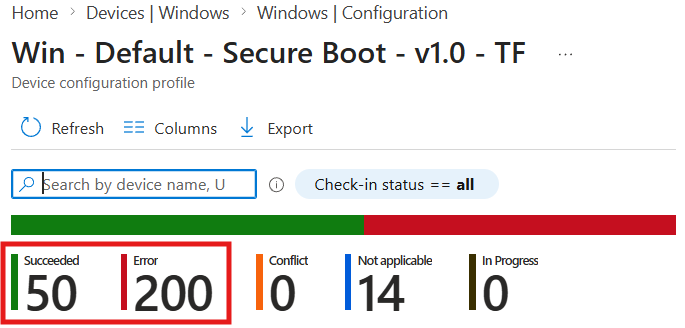
Setting showing Error Code 65000?
Microsoft updated the Intune licensing service on January 27, 2026, to enable Secure Boot configuration deployment on Windows Pro editions. In theory, this should allow the issue to resolve automatically over time.
However, I’m still seeing the majority of devices encounter this error (Enterprise devices that were upgraded through Subscription Activation are also experiencing this error). Hopefully, this gets addressed more broadly soon.
Update April 2026: Devices updated via Hotpatch are still experiencing this issue. My assumption is that the next Hotpatch baseline update on April 14 will resolve the issue. Quick comparison between a tenant without and with Hotpatch:

Check deployment status
Intune is offering an overview under Reports > Windows quality updates > Secure Boot status:

For more details, you can monitor the following registry keys:
MicrosoftUpdateManagedOptIn *1: Status of Intune setting "Configure Microsoft Update Managed Opt In" (active if other value than 0)
UEFICA2023Status *2 - status "NotStarted", "InProgress" or "Updated"
UEFICA2023Error *2 - possible errors
1: HKEY_LOCAL_MACHINE\SYSTEM\CurrentControlSet\Control\SecureBoot 2: HKEY_LOCAL_MACHINE\SYSTEM\CurrentControlSet\Control\SecureBoot\Servicing
Wrap-up
What you should do now:
Enable "Configure Microsoft Update Managed Opt In" in Intune so devices receive the new Secure Boot certificates more pro-actively.
Make sure devices get their BIOS updates to avoid compatibility issues (check whether your Windows Update rings allow “Windows drivers” and review your driver update profiles if in place).
After that, relax - your devices will still boot after June 2026. Giving the opt-in will hopefully update the Secure Boot certificates on the majority of devices over the next few months. This positions them to continue receiving new security protections for the boot process and ensures they remain compatible with future Windows images signed only with the 2023 certificates.


Comments